
Terminal UI
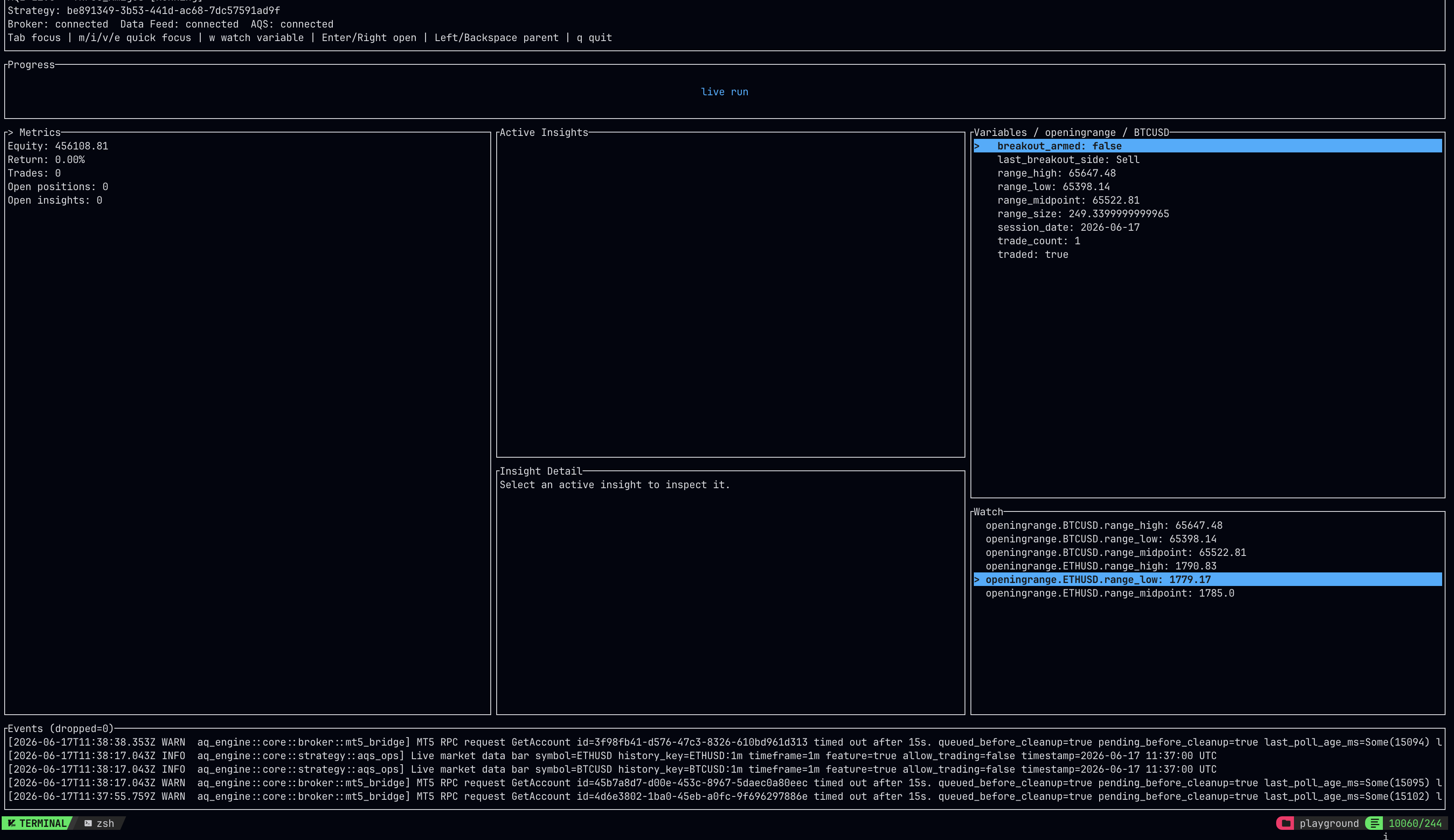
AQE can run with a terminal UI when the crate is compiled with the runtime and tui features. The interface is built with Ratatui and is designed for local backtests, live sessions, and long-running strategy supervision when you want more structure than a raw log stream.
The TUI reads runtime snapshots from AQE memory where possible. That keeps the interface lightweight: active strategy state, variables, metrics, active insights, progress, and events are rendered from the running process rather than being fetched from AQS Cloud or local live databases. Persisted result databases are still used for historical review after data has left engine memory.
Enabling the TUI
Section titled “Enabling the TUI”Enable both features on the strategy project:
aq-engine = { git = "https://github.com/algoquantstudio/aq-engine", version = "0.1.9", features = ["runtime", "tui"] }Then run the strategy from an interactive terminal:
cargo run --features runtime,tui --releaseWhen both features are compiled and stdout/stderr are attached to a terminal, AQE starts the TUI automatically for backtest and live runs.
Use --no-tui to keep the traditional console log output:
cargo run --features runtime,tui --release -- --no-tuiPanels
Section titled “Panels”The terminal UI is split into scan-friendly runtime panels:
- Metrics shows the same backtest result fields that AQE prints to the console, including final equity, return, drawdown, ratios, trade counts, holding-period summaries, execution timestamps, history points, trade log size, and result path when available.
- Insights lists active insights and lets you select one to inspect state, order fields, parent id, quantities, prices, TP/SL levels, and state history.
- Variables shows strategy variables as a nested list. Objects and arrays can be opened so you can inspect structured strategy state without flattening it into strings.
- Watch stores selected variable paths from the Variables panel so important state stays visible while the strategy runs.
- Events shows runtime logs and operational events with timestamp and level prefixes.
Backtests also show progress based on processed market steps, total market steps, current timestamp, and registered event-stream counts.
Live runs include AQS sync state, broker status, datafeed status, universe, runtime logs, active insights, and live metrics. When a live run is connected to AQS Cloud, the TUI shows the sync state locally while AQS remains the richer desktop monitoring surface.
Controls
Section titled “Controls”| Key | Action |
|---|---|
Tab / Shift+Tab |
Move focus between panels |
m |
Focus Metrics |
i |
Focus Insights |
v |
Focus Variables |
e |
Focus Events |
Up / Down |
Move selection or scroll the focused panel |
PageUp / PageDown |
Scroll Events by a page |
Home / End |
Jump to the start or end of Events |
Enter / Right |
Open the selected nested variable |
Backspace / Left |
Move up one variable level |
w in Variables |
Add or remove the selected variable path from Watch |
w, Backspace, or Delete in Watch |
Remove the selected watch |
q / Esc |
Request shutdown or close the TUI when the run has stopped |
For live runs, q or Esc first requests strategy shutdown so AQE can run teardown logic. After the strategy reaches a terminal state, press q again to close the TUI. This prevents the interface from disappearing while the live process is still running.
For completed backtests, AQE keeps the TUI open so you can review final metrics, logs, insights, and the saved result path before exiting.
Performance notes
Section titled “Performance notes”The TUI is intentionally a local runtime view:
- snapshots are updated from AQE strategy state behind a lock;
- render refreshes are throttled;
- event storage is bounded, with dropped-event counts exposed in the Events panel;
- it does not require AQS Cloud to be connected;
- it avoids querying local live databases for data that is still available in process memory.
If you are running a strategy in a non-interactive process manager, CI job, or service wrapper, pass --no-tui and keep the normal structured console logs.
We use essential cookies and storage for sign-in, account security, colour theme preferences, this notice, and required PostHog internal usage, session quality, and reliability metrics. We do not use advertising cookies.